
Automated Action Emails
Updated Oct 30, 2026·1 min read
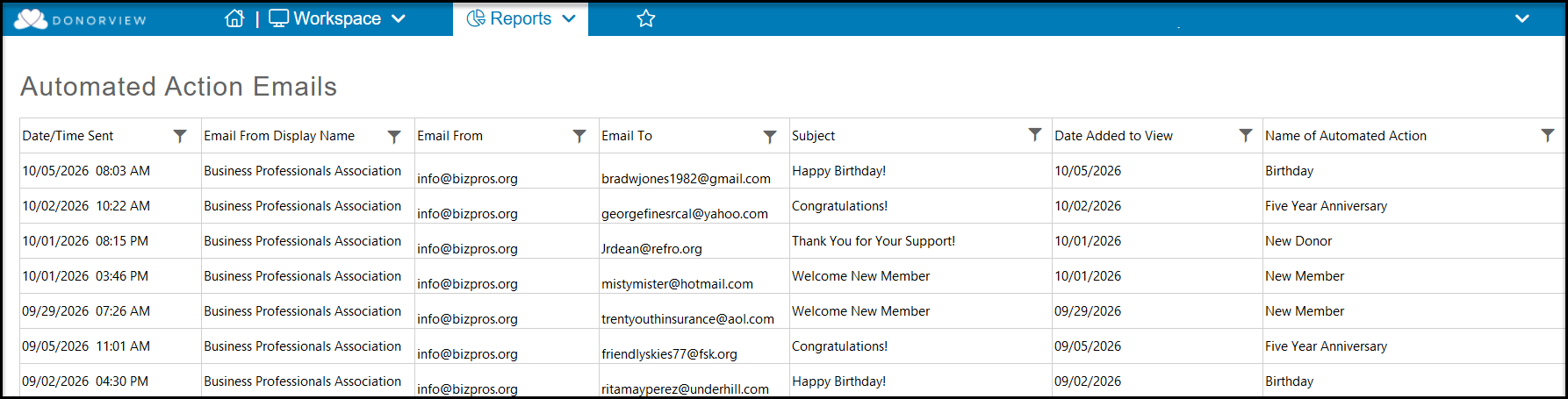
Grid to display emails send as a result of CRM Module Automated Actions
If you send emails to your constituents via the CRM module's Automated Actions feature, you can find a list of all emails generated in the Reports module under Automated Action Emails.
The grid will show the following information:
- Date/Time Sent - the date and time the email was sent
- Email From Display Name - the name of your organization or the sender
- Email From - the email address of the sender
- Email To - the email address of the recipient (constituent)
- Subject - the subject line of the email
- Date Added to View - the date the action was triggered
- Name of the Automated Action - the name assigned in the Automated Actions grid
This grid does not have an Actions menu or a view builder, it is intended for information only.
Was this article helpful?