
DonorViewHelp center
Ask AIAll articlesContactContact supportSign inSign up
Browse
  • General Information & Overviews
  • Organization Account Management
  • DonorView User Management
  • Grids, Dashboards & Software Functionality
  • CRM Module
  • Fundraising Module
  • Events Module
  • Peer To Peer Fundraising Module
  • Volunteer Module
  • General Memberships Module
  • Youth Memberships Module
    • Overview & Setup
    • Youth Membership & Programs User Security
    • Youth Members
    • Youth Membership Enrollment
    • Attendance
    • Parent Portal
      • How can I Edit the Parent Portal Info page?
      • Where can I find the link to the Parent Portal?
  • Auctions Module
  • Email Marketing Module
  • Surveys/Forms Module
  • Reports Module
  • Constituent Portal
  • Mobile Devices & DV Connect App
  • Quickbooks Integration
  • Training
  • Blog Posts
Help center/Youth Memberships Module/Parent Portal

Where can I find the link to the Parent Portal?

Updated Jun 20, 2025·1 min read

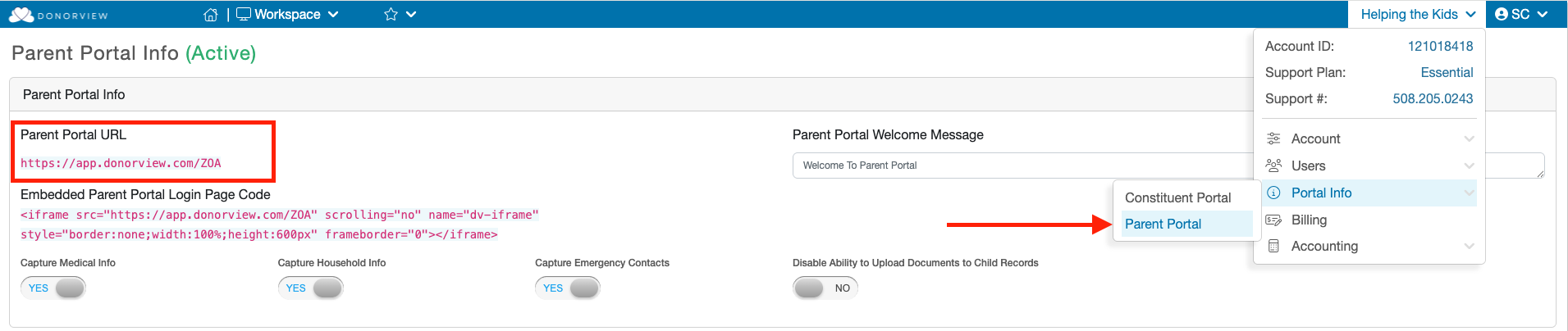
The URL for the Parent Portal can be found under your Account menu. Mouse over your Orangization's name in the upper right hand corner and then mouse over the the "Portal Info" menu option. Click the "Parent Portal" option under that sub-menu and the Parent Portal URL will be list at the top of that page in red text.
Was this article helpful?

Related articles

How can I Edit the Parent Portal Info page?
PreviousHow can I Edit the Parent Portal Info page?
© ConnectedView LLc
Help centerContact supportPowered by BlueHill