What are the summary data columns on the Constituents grid?
The Constituents grid includes many columns which are automatically generated from historical data. These fields, shown below, include summary information for giving history, memberships, time tracking, event attendance, email open rates, and interactions. The columns only update once per day, overnight. So if there is new data entered today, for example a new donation recorded, the new totals will not be reflected on the grid until the next morning. (Additional information below the table)
| Column/Field Name | Data Type | Notes |
| First Gift Date | Date | Auto populated field with the date of the first gift record |
| First Gift Amount | Currency | Auto populated field with the first gift amount |
| Last Gift Date | Date | Auto populated field with the date of the last gift |
| Last Gift Amount | Currency | Auto populated field with the amount of the last gift made |
| Largest Gift Date | Date | Auto populated field with the date of largest gift recorded |
| Largest Gift Amount | Currency | Auto populated field with the amount of the largest gift recorded |
| Smallest Gift Date | Date | Auto populated field with the date of the smallest gift recorded |
| Smallest Gift Amount | Currency | Auto populated field with the amount of the smallest gift recorded |
| Average Gift Amount | Currency | Auto calculated field with the average of all gifts |
| Cumulative Received Amount | Currency | Auto calculated field totaling all gifts |
| Cumulative Gift Count | Numeric | Auto calculated field with the number of total gifts given |
| Cumulative Pledge Amount | Numeric | Auto calculated field with the total of all pledges |
| Cumulative Pledge Write Off Amount | Currency | Auto calculated field with the total of all write offs for pledges |
| YTD Gift Count | Numeric | Auto calculated field totaling the number of gifts in this calendar year |
| YTD Received Amount | Currency | Auto calculated field totaling the amount of gifts received this calendar year |
| YTD Pledged Amount | Currency | Auto calculated field totaling the amount of pledges received this calendar year |
| YTD Pledge Write Off Amount | Currency | Auto calculated field totaling the pledge write offs in this calendar year |
| Last Year Received Amount | Currency | Auto calculated field totaling the number of gifts last calendar year |
| Last Year Gift Count | Numeric | Auto calculated field totaling the amount of gifts received last calendar year |
| Last Year Pledged Amount | Currency | Auto calculated field totaling the amount of pledges received last calendar year |
| Last Year Pledge Write Off Amount | Currency | Auto calculated field totaling the pledge write offs in last calendar year |
| Five Years Gift Count | Numeric | Auto calculated field totaling number of gifts in the last five calendar years |
| Five Years Received Amount | Currency | Auto calculated field totaling the amount received in the last five calendar years |
| Five Years Pledged Amount | Currency | Auto calculated field totaling number of pledges in the last five calendar years |
| Five Years Pledge Write Off Amount | Currency | Auto calculated field totaling the pledge write offs in last five calendar years |
| FYTD Gift Count | Numeric | Auto calculated field totaling the number of gifts in this fiscal year |
| FYTD Received Amount | Currency | Auto calculated field totaling the amount of gifts received this fiscal year |
| FYTD Pledged Amount | Currency | Auto calculated field totaling the amount of pledges received this fiscal year |
| FYTD Pledge Write Off Amount | Currency | Auto calculated field totaling the pledge write offs in this fiscal year |
| Last Fiscal Year Gift Count | Numeric | Auto calculated field totaling the number of gifts last fiscal year |
| Last Fiscal Year Received Amount | Currency | Auto calculated field totaling the amount of gifts received last fiscal year |
| Last Fiscal Year Pledged Amount | Currency | Auto calculated field totaling the amount of pledges received last fiscal year |
| Last Fiscal Year Pledge Write Off Amount | Currency | Auto calculated field totaling the pledge write offs in the last fiscal year |
| Five Fiscal Years Gift Count | Numeric | Auto calculated field totaling number of gifts in the last five fiscal years |
| Five Fiscal Years Received Amount | Currency | Auto calculated field totaling the amount received in the last five fiscal years |
| Five Fiscal Years Pledged Amount | Currency | Auto calculated field totaling number of pledges in the last five fiscal years |
| Five Fiscal Years Pledge Write Off Amount | Currency | Auto calculated field totaling the pledge write offs in last five fiscal years |
| Last Interaction Date/Time | Date/Time | Auto populated field with the date and time of the last interaction recorded |
| Last Interaction Internal Contact First Name | Text | Auto populated field - with the first name of the DonorView user identified for the last interaction |
| Last Interaction Internal Contact Last Name | Text | Auto populated field - with the last name of the DonorView user identified for the last interaction |
| Last Interaction Description | Multi-Line Text | Auto populated field with the description of the last interaction |
| Last Interaction Category 1 | Picklist | Auto populated field from the category 1 identified in the last interaction |
| Last Interaction Category 2 | Picklist | Auto populated field from the category 2 identified in the last interaction |
| Continuous Years Giving | Numeric | Shows the number of years the constituents has continously made a transaction |
| First Membership Date | Date | Date of the first membership |
| Family Membership Status | Text | Auto populated field from the membership grid which shows "Active" if the constituent has any memberships with a future expiration date |
| Current Membership Exp Date | Text | Auto calculated field if they have memberships it will show the farthest exp date |
| Cumulative Event Attendance Count | Numeric | Auto calculated field based on checked in attendance for events after 8/1/2023 |
| Last Event Attendance Date | Date | Auto calculated field based on checked in attendance an event after 8/1/2023 |
| Last Event Ticket Purchased Cost | Currency | The ticket price of the last event the constituent purchased |
| Last Event Ticket Purchased Date | Date | The date of the last ticket purchased |
| Cumulative Event Ticket Purchased Count | Numeric | The total number of event tickets the constituent purchased |
| YTD Event Ticket Purchased Count | Numeric | The total number of event tickets purchased calendar year to date |
| FYTD Event Ticket Purchased Count | Numeric | The total number of event tickets purchased in the current fiscal year |
| Last Calendar Year Event Ticket Purchased Count | Numeric | The total number of event tickets purchased in the last calendar year |
| Last Fiscal Year Event Ticket Purchased Count | Date | The total number of event tickets purchased in the last fiscal year |
| YTD Event Attendance Count | Numeric | Total number of events the constituent has been checked in for on the event attendance grid this calendar year |
| FYTD Event Attendance Count | Numeric | Total number of events the constituent has been checked in for on the event attendance grid this fiscal year |
| Last Calendar Year Event Attendance Count | Numeric | Total number of events the constituent has been checked in for on the event attendance grid last calendar year |
| Last Fiscal Year Event Attendance Count | Numeric | Total number of events the constituent has been checked in for on the event attendance grid last fiscal year |
| Emails Opened YTD Count | Numeric | Number of emails opened calendar year to date |
| Emails Opened FYTD Count | Numeric | Number of emails opened this fiscal year to date |
| Emails Opened Last Calendar Year Count | Numeric | Number of emails opened last calendar year |
| Emails Opened Last Fiscal Year Count | Numeric | Number of emails opened last fiscal year |
| Email Links Clicked YTD Count | Numeric | Number of links clicked in an opened email this calendar year |
| Email Links Clicked FYTD Count | Numeric | Number of links clicked in an opened email this fiscal year |
| Email Links Clicked Last Calendar Year Count | Numeric | Number of links clicked in an opened email last calendar year |
| Email Links Clicked Last Fiscal Year Count | Numeric | Number of links clicked in an opened email last fiscal year |
| Last Email Opened Date | Date | Date the last email was opened |
| Time This Week | Hours | Auto calculated field from time tracking for time entered this week |
| Time Last Week | Hours | Auto calculated field from time tracking for time entered last week |
| Time This Month | Hours | Auto calculated field from time tracking for time entered this month |
| Time Last Month | Hours | Auto calculated field from time tracking for time entered last month |
| Time This Year | Hours | Auto calculated field from time tracking for time entered this calendar year |
| Time This Fiscal Year | Hours | Auto calculated field from time tracking for time entered this fiscal year |
| Time Last Year | Hours | Auto calculated field from time tracking for time entered last calendar year |
| Time Last Fiscal Year | Hours | Auto calculated field from time tracking for time entered last fiscal year |
| Time Five Years | Hours | Auto calculated field from time tracking for time entered the last five calendar years |
| Time Five Fiscal Years | Hours | Auto calculated field from time tracking for time entered the last five fiscal years |
| Time Cumulative | Hours | Auto calculated field from time tracking for all time recorded |
| Total Time Records | Numeric | Shows the number of total time tracking records |
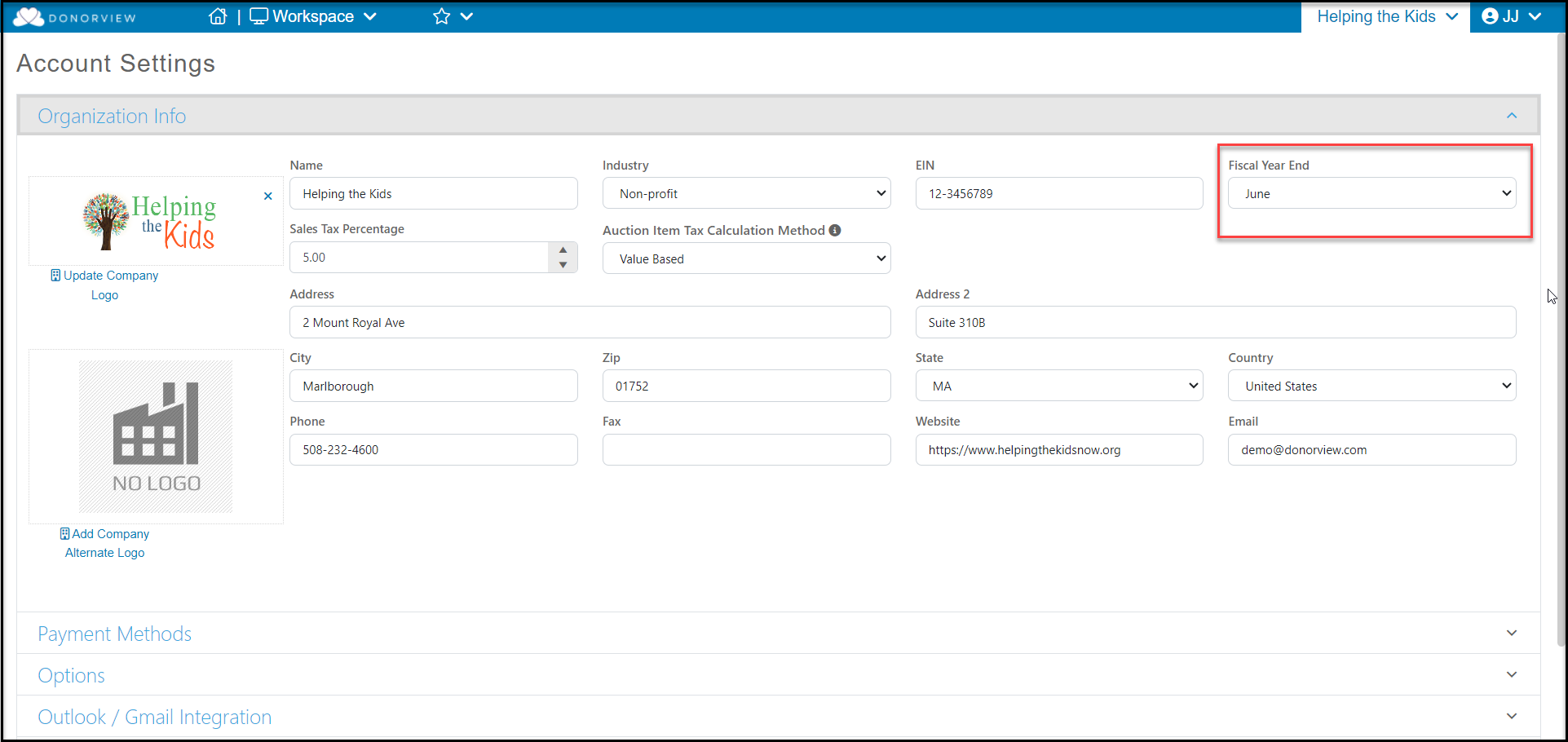
By default the gift fields will include any general, event, in kind, stock, or pledge payment types of transactions. You can add in memberships and soft credits into these calculation if desired by going to the Account Settings page located in the menu under your organization's name. In Account Settings, go to the Options section.
- Mark Include Soft Credits in Gift Calculations? to YES to include any general, event, in kind, stock, or pledge payments that are soft credited to the constituent in their summary totals.
- Mark Include General Memberships in Gift Calculations? to YES to include any membership type transactions in the summary totals.
You also can choose the total number of days that are included in the calculations as well as what date is used for calculations.
- In Gift History Default Days you can enter a total number of days you wish to use in calculations. So if you have many years of data, you can limit it to something like 10 years (3,653) if desired. If this field is blank it will use all of the data.
- Under Date to Use in Gift Calculations it defaults to the Check Date, but you can select the Date of Gift, Postmark Date, or Deposit Date as desired.
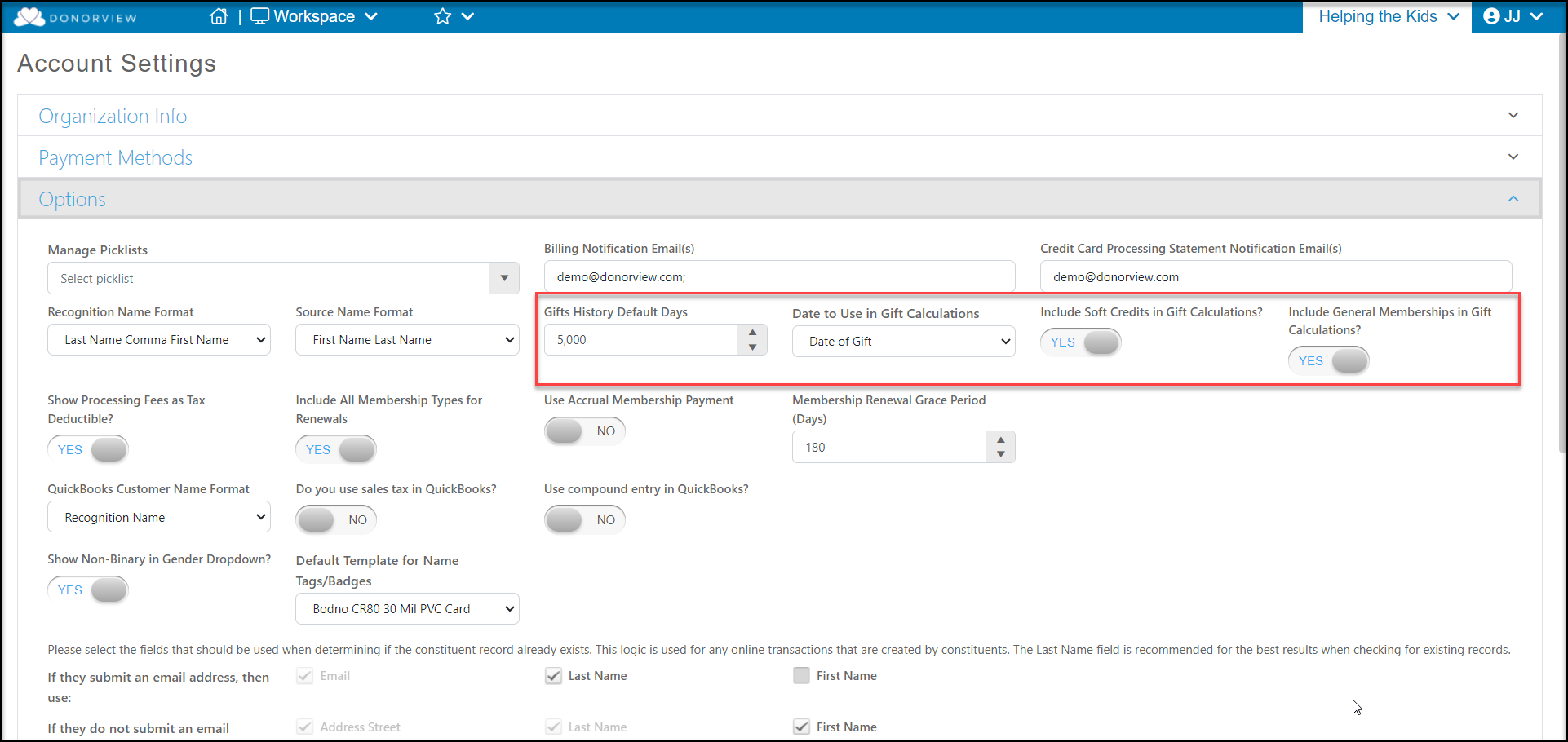
Your fiscal year data is determined by the month entered in the Fiscal Year End field in the Organization Info section of your organization's Account Settings. For example, if June is entered, the Fiscal Year data fields will include transactions between July 1st and June 30th.