
Volunteer Module Overview
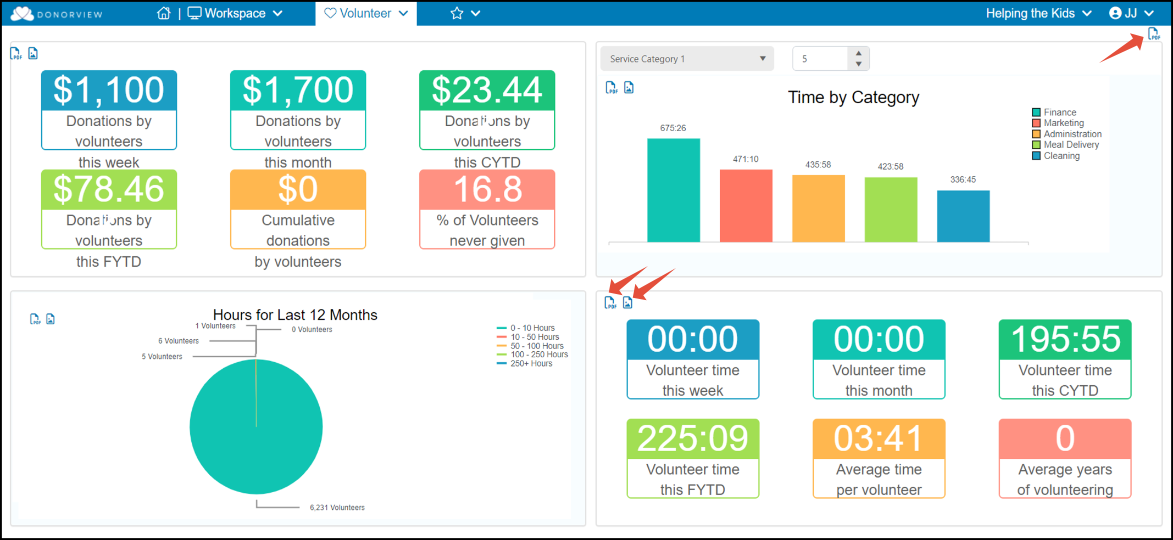
The Volunteer Module allows you to manage volunteer activities including their applications, event registrations, and time tracking. The dashboard provides some summary graphics including giving patterns for volunteers, top volunteers in the different service categories, a pie chart of range of hours over the last 12 months, and total time recorded for the week, month, and year. The entire dashboard can be exported as a pdf by clicking on the pdf icon in the top right corner. Each graph can also be exported as a pdf or png file.
The activities within the Volunteer module sync with other modules in the software.
- The Applications page syncs with the Surveys/Forms Results page. The Applications page will show only surveys/forms identified as "Volunteer Application" on the Settings tab. You can review and manage your volunteer applications here.
- The Time Tracking page will show time recorded for constituents who are identified with the "Volunteer" constituent category. The same information is included on the CRM Module's Time Tracking grid, however the CRM version shows all time tracking, not just time tracking for constituents with the Volunteer category.
- The Registrations page will show volunteers who registered for a volunteer event. It syncs with the Events grid, but will only show those events identified as volunteer events.
- The Attendance page will show a list of all volunteers who are identified as attendees for a volunteer event. It syncs with the Event Attendance grid, but only shows volunteer events.
- If a volunteer event has been created, the Schedulerpage allows you to see a daily, weekly, monthly view of volunteer shifts and who is registered for the volunteer event. It syncs with the Events module's Scheduler. You can assign constituents to levels for internal management of your volunteer program.
See this article "What are the options for managing volunteers?" to learn more about setting up and managing your volunteer activities in DonorView.