# Processing a Youth Member Fee
> Source: https://support.donorview.com/processing-a-youth-member-fee | Updated: 2025-03-31T14:34:08Z
Once your fees have been established, they are available to be charged to your Youth Members.
To charge a fee:
1. Navigate to the **Youth Member grid**.
2. Click on the member’s **last name** to access their record.
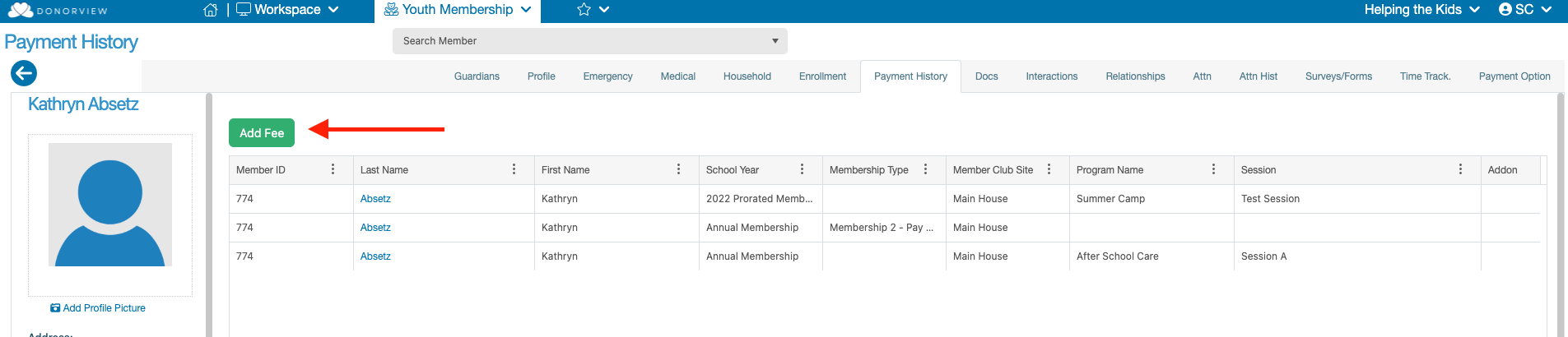
3. Once inside the record, go to the **“Payment History”** tab.
This tab displays a grid of all previous charges related to the member’s enrollments and other transactions.
At the top of the grid, click the green **“Add Fee”** button to open the checkout dialog for charging fees.
 ---
### Charging a Fee
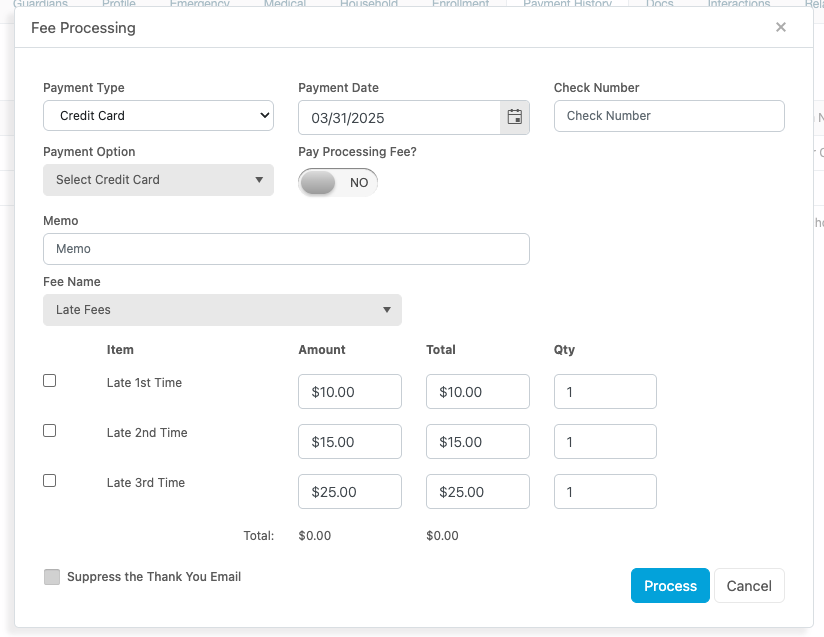
Once the dialog is launched, you’ll be able to select payment details such as the **Payment Type**.
- Selecting **“Credit Card”** allows you to charge a saved credit card on the constituent's record.
- Other payment types will record the transaction without charging anything directly.
- If charging a credit card, you can optionally choose to **include processing fees**.
---
### Charging a Fee
Once the dialog is launched, you’ll be able to select payment details such as the **Payment Type**.
- Selecting **“Credit Card”** allows you to charge a saved credit card on the constituent's record.
- Other payment types will record the transaction without charging anything directly.
- If charging a credit card, you can optionally choose to **include processing fees**.
 ---
### Selecting and Customizing Fees
Next, under the **“Fee Name”** dropdown, select the desired fee setup.
All fees created under that setup will appear below.
- **Check off** the fees you want to include in the charge.
- You may **adjust the amount** or **increase the quantity** as needed.
- You can include **multiple fees** in one transaction, but **only from the same fee setup**.
> If you need to charge fees from different setups, you must process separate transactions.
---
### Final Steps
Before submitting, you have the option to **“Suppress the Thank You Email”**—this prevents an email from being sent to the Head of Household.
Click the blue **“Process”** button to:
- Generate the transaction record, and
- If a credit card was selected, charge the card for the total amount.
If the **Thank You Email is not suppressed**, it will automatically be sent to the **Head of Household/Guardian** listed on the Youth Member’s record.
---
### Selecting and Customizing Fees
Next, under the **“Fee Name”** dropdown, select the desired fee setup.
All fees created under that setup will appear below.
- **Check off** the fees you want to include in the charge.
- You may **adjust the amount** or **increase the quantity** as needed.
- You can include **multiple fees** in one transaction, but **only from the same fee setup**.
> If you need to charge fees from different setups, you must process separate transactions.
---
### Final Steps
Before submitting, you have the option to **“Suppress the Thank You Email”**—this prevents an email from being sent to the Head of Household.
Click the blue **“Process”** button to:
- Generate the transaction record, and
- If a credit card was selected, charge the card for the total amount.
If the **Thank You Email is not suppressed**, it will automatically be sent to the **Head of Household/Guardian** listed on the Youth Member’s record.