# Auction Item Sales Tax
> Source: https://support.donorview.com/auction-item-sales-tax-dv | Updated: 2025-10-20T13:24:24Z
For some states, sales tax is required to be collected for any auction items that are sold. As each of those states have different rules regarding how the sales tax is calculated, we have added several options for you to choose from. Check with your organization's financial advisor to determine what the sales tax requirements are for your state.
The setting for **Auction Item Sales Tax Calculation Method** can be found in your Account Settings. If you are an Admin user mouse over your Organization’s Name in the upper right-hand corner of the software and click on **Account**, the **Settings**.
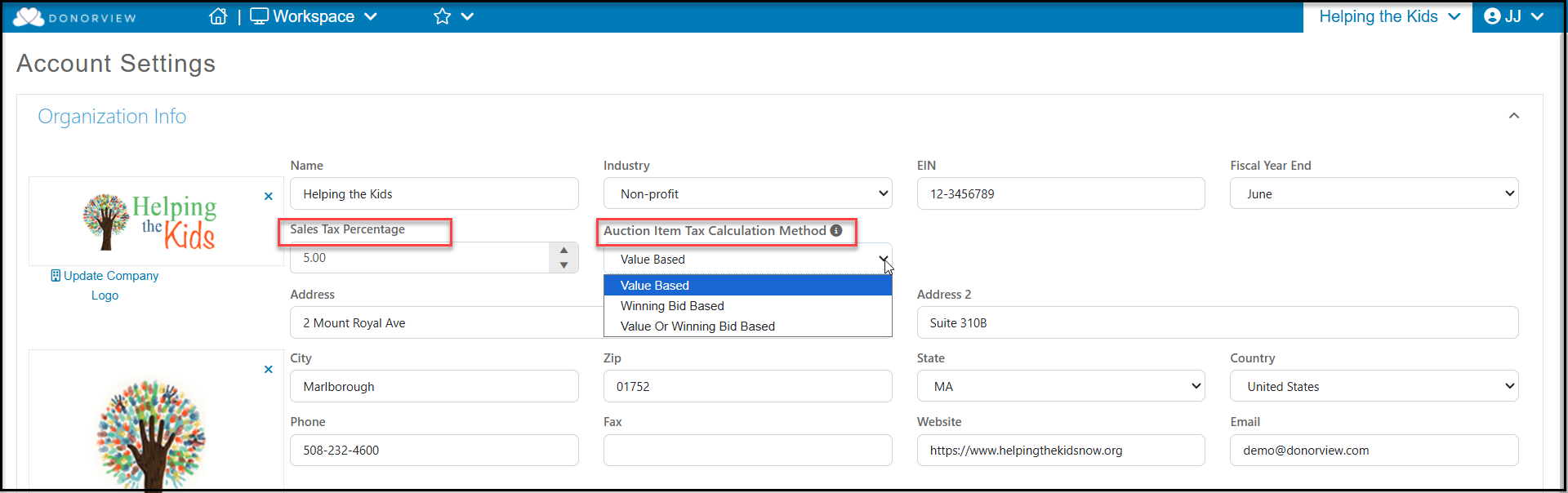 Once on the main Account screen, you will find a dropdown field titled, “**Auction Item Tax Calculation Method**,” which appears to the right of where you would enter in the appropriate sales tax percentage for your location. Within the picklist for the **Auction Item Tax Calculation Method** dropdown, there are 3 options: **Value Based**, **Winning Bid Based** and **Value or Winning Bid Based**. Below are specifics for each of those settings as well as examples.
**Value Based** - The sales tax on an auction item will be calculated based on the item's value regardless of the winning bid amount.
**Winning Bid = $50** (Less than Item Value)
Item Value = $100
Sales Tax = 5%
Item Value (Item Value\*Sales Tax) = Total
**100 (100\*.05) = $105 Total Charge**
Or
**Winning Bid = $500** (Greater than Item Value)
Item Value = $100
Sales Tax = 5%
Item Value (Item Value\*Sales Tax) = Total
**100 (100\*.05) = $105 Total Charge**
**Winning Bid Based** - The sales tax on an auction item will be calculated based on the winning bid amount regardless of the item's value.
**Winning Bid = $50** (Less than Item Value)
Item Value = $100
Sales Tax = 5%
Winning Bid (Winning Bid\*Sales Tax) = Total
**50 (50\*.05) = $52.50 Total Charge**
Or
**Winning Bid = $500** (Greater than Item Value)
Item Value = $100
Sales Tax = 5%
Winning Bid (Winning Bid\*Sales Tax) = Total
**500 (500\*.05) = $525.00 Total Charge**
**Value or Winning Bid Based** - The sales tax on an auction item will be calculated based on the item's value if the winning bid is greater or equal than the item's value. If the winning bid is less than the item value, then the sales tax will be calculated based on the winning bid amount.
**Winning Bid = $50** (Less than Item Value)
Item Value = $100
Sales Tax = 5%
Winning Bid (Winning Bid\*Sales Tax) = Total
**50 (50\*.05) = $52.50 Total Charge**
Or
**Winning Bid = $500** (Greater than Item Value)
Item Value = $100
Sales Tax = 5%
Item Value (Item Value\*Sales Tax) = Total
**100 (100\*.05) = $105 Total Charge**
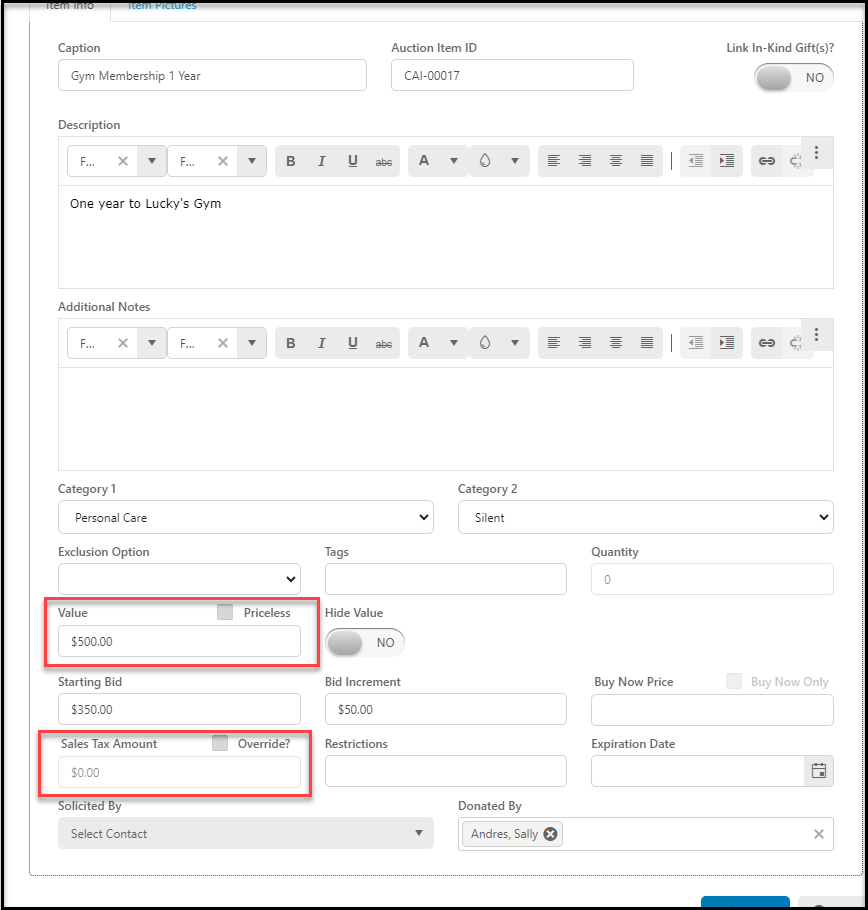
The **Value** of an item can be found in the auction item description. If the item was imported from a in-kind donation, this value is also the **Sale Value** in the donation record. Note that the **Sales Tax Amount** field will remain zero on the auction setup description until auction checkout. This amount can also be overridden and manually entered using the **Override?** checkbox.
Once on the main Account screen, you will find a dropdown field titled, “**Auction Item Tax Calculation Method**,” which appears to the right of where you would enter in the appropriate sales tax percentage for your location. Within the picklist for the **Auction Item Tax Calculation Method** dropdown, there are 3 options: **Value Based**, **Winning Bid Based** and **Value or Winning Bid Based**. Below are specifics for each of those settings as well as examples.
**Value Based** - The sales tax on an auction item will be calculated based on the item's value regardless of the winning bid amount.
**Winning Bid = $50** (Less than Item Value)
Item Value = $100
Sales Tax = 5%
Item Value (Item Value\*Sales Tax) = Total
**100 (100\*.05) = $105 Total Charge**
Or
**Winning Bid = $500** (Greater than Item Value)
Item Value = $100
Sales Tax = 5%
Item Value (Item Value\*Sales Tax) = Total
**100 (100\*.05) = $105 Total Charge**
**Winning Bid Based** - The sales tax on an auction item will be calculated based on the winning bid amount regardless of the item's value.
**Winning Bid = $50** (Less than Item Value)
Item Value = $100
Sales Tax = 5%
Winning Bid (Winning Bid\*Sales Tax) = Total
**50 (50\*.05) = $52.50 Total Charge**
Or
**Winning Bid = $500** (Greater than Item Value)
Item Value = $100
Sales Tax = 5%
Winning Bid (Winning Bid\*Sales Tax) = Total
**500 (500\*.05) = $525.00 Total Charge**
**Value or Winning Bid Based** - The sales tax on an auction item will be calculated based on the item's value if the winning bid is greater or equal than the item's value. If the winning bid is less than the item value, then the sales tax will be calculated based on the winning bid amount.
**Winning Bid = $50** (Less than Item Value)
Item Value = $100
Sales Tax = 5%
Winning Bid (Winning Bid\*Sales Tax) = Total
**50 (50\*.05) = $52.50 Total Charge**
Or
**Winning Bid = $500** (Greater than Item Value)
Item Value = $100
Sales Tax = 5%
Item Value (Item Value\*Sales Tax) = Total
**100 (100\*.05) = $105 Total Charge**
The **Value** of an item can be found in the auction item description. If the item was imported from a in-kind donation, this value is also the **Sale Value** in the donation record. Note that the **Sales Tax Amount** field will remain zero on the auction setup description until auction checkout. This amount can also be overridden and manually entered using the **Override?** checkbox.